unsolicited guidance, every mile
Graph-based workflows for coding agents.
A workflow is a graph: states, the transitions between them, and the instructions for each. The agent reaches a state and is told what to do there and which transitions are open; anything else is refused with a reason. Most frameworks call the model and decide its next step; Backseat tells the model which steps are open and lets it choose.
The green signs on this page are snippets of one real workflow: a research lead that cuts a question into sub-tasks, sends a worker after each, and writes up what comes back.
$ node cli.ts --drive send 1b36b700…/task-1-3 queries.submit -{
"queries": [
"Shepherd of the Hills Fish Hatchery Branson kids fishing",
"Table Rock Lake trout fishing Lake Taneycomo kids family",
"Roaring River State Park trout fishing kids Cassville Missouri",
"Bass Pro Shops Springfield Missouri kids fishing pond Lake Springfield"
]
}You are handed one query at a time as `data.current`. Run it with whatever web search you have — this workflow provides none — read the hits yourself, and report the query done, naming the query you ran; the response hands you the next one. Keep what you find: you write the finding from it at the end and nothing here stores it for you. A query that returns nothing is still a query run — report it rather than inventing a result. If reading the hits surfaces a further query, add it to the queue. Answer the sub-question thoroughly: where a hit bears on it, read the page itself rather than the snippet, and if a page refuses you, try any other way you have of fetching it before settling for the snippet. Keep note of which facts came from snippets alone. When the last query is reported you will be moved on. ## Data - current: string Shepherd of the Hills Fish Hatchery Branson kids fishing ## To move to state: searching (Queries are being worked one at a time.) ### search.results → searching (Another query is waiting.) query: "Shepherd of the Hills Fish Hatchery Branson kids fishing" ### queries.add → searching (The hits surfaced a query worth running.) queries: string[] // min 1 items, each: min length 3 --- 1b36b700…/task-1-3 · at searching · active
don't worry, I wrote it down
Everything the workflow knows lives in one context: the question, the round it is on, the sub-tasks still queued, the findings so far. A transition writes to it; a state reads from it. Instructions, schema and data are written as functions of context and computed each time the agent reaches a state, and the agent is handed exactly what that state declares. Nothing else in context reaches it.
you write · deep-research.ts, trimmed to one write and one read
context: () => ({ question: '', round: 0, maxRounds: 3 }), planning: { on: { 'plan.submit': { // Writes to context. actions: assign(({ context }) => ({ round: context.round + 1, … })), }, }, // Reads context for the agent: only these values reach it. data: ({ context, event }) => ({ round: context.round + 1, maxRounds: context.maxRounds, … }), },
the context · internal, never shown; as the agent reaches planning
{
"question": "Where is the best place to take my kids fishing in Branson, MO?",
"round": 0,
"maxRounds": 4
}the agent sees · the arrival at planning, handed only what its data declares
$ node cli.ts --drive send 1b36b700… brief.submit -You are planning round `data.round` of at most `data.maxRounds`. Start broad: a first round maps the ground — which candidates, sources and angles exist — rather than trying to settle the answer, and later rounds add depth aimed at what it turns up. … ## Data - round: number 1 - maxRounds: number 4 … ## To move to state: researching (Workers are being dispatched and are running.) ### plan.submit → researching (The round has its sub-tasks.) subTasks: { subQuestion: string // min length 10 }[] // min 10 items, max 40 items --- 1b36b700… · at planning · active
I'll tell you what to do when we get there
Every state and every transition carries a one-line description: a clarification of what it is, read while the agent is choosing. There are no instructions in it. Instructions are what a state hands the agent by being reached, computed from context and from whether this is a first visit or a return. So the agent commits to a transition before it reads a word of what it will be asked to do there.
you write · research-task.ts, trimmed to the descriptions and the instructions
searching: {
on: {
'search.results': {
target: 'summarizing',
// A clarification of the transition, read while choosing. No instructions here.
description: 'That was the last query.',
…
},
},
},
summarizing: {
// A clarification of the state, read while choosing. No instructions here.
description: 'Every query has been answered; the sub-task needs a written finding.',
// Handed to the agent on arrival, told the context and which visit this is.
instructions: ({ visit }) =>
visit === 'first'
? 'Write a finding that answers `data.subQuestion` from the hits you gathered, …'
: 'Conclude on `data.subQuestion`: write the finding, say that nothing supports an answer, or resume the search.',
},the agent sees, while choosing · the worker's last query reported, with summarizing offered in two lines
$ node cli.ts --drive send 1b36b700…/task-1-3 search.results -… ## To move to state: summarizing (Every query has been answered; the sub-task needs a written finding.) ### search.results → summarizing (That was the last query.) …
the agent sees, on arrival · the worker in summarizing, handed the paragraph it could not read before
$ node cli.ts --drive send 1b36b700…/task-1-3 search.results -Write a finding that answers `data.subQuestion` from the hits you gathered, listing only the sources you actually drew on. `data.question` is the research question it was cut from: it tells you what the finding will be read for, not what to answer. If the hits are too thin, or what the finding turns on rests on snippets you could still read at the source, resume the search with further queries instead. Say in the finding which facts came from snippets alone. If you have searched and nothing you found supports an answer, say so and give the reason: do not pad a finding out, and do not list a source you would not stand behind. A stated absence is worth more to the lead than a finding you do not believe. … ## To move to state: complete (The sub-task is finished, with a finding or a stated absence.) ### finding.submit → complete (The sub-question is answered.) ### finding.empty → complete (Nothing found supports an answer.) ## To move to state: searching (Queries are being worked one at a time.) ### search.resume → searching (The hits do not yet answer it.)
we're not taking the exit until you say which one and why
The schema is what the agent has to produce to get through, printed under the move while the agent is still choosing, so the proof is never a guess. It can be computed from context, so what a checkpoint asks for can depend on where the run is. A state can carry a schema of its own, the price of entering it by whichever transition arrives; the runtime extends it with the transition's, and the agent reads one contract.
you write · research-task.ts, summarizing trimmed to its two exits and their schemas
const source = z.object({ url: z.url(), title: z.string().min(1) }) summarizing: { on: { 'finding.submit': { target: 'complete', description: 'The sub-question is answered.', // The checkpoint: no finding and no source, no leaving this state. schema: z.object({ summary: z.string().min(80), sources: z.array(source).min(1) }), … }, 'finding.empty': { target: 'complete', description: 'Nothing found supports an answer.', // The other way out, with its own proof: a reason, not a shrug. schema: z.object({ reason: z.string().min(80) }), … }, }, },
the agent sees · the arrival at summarizing, the finding.submit it sent, and the response
$ node cli.ts --drive send 1b36b700…/task-1-3 search.results -… ## To move to state: complete (The sub-task is finished, with a finding or a stated absence.) ### finding.submit → complete (The sub-question is answered.) summary: string // min length 80 sources: { url: string // uri title: string // min length 1 }[] // min 1 items ### finding.empty → complete (Nothing found supports an answer.) reason: string // min length 80 …
$ node cli.ts --drive send 1b36b700…/task-1-3 finding.submit -{
"summary": "All findings come from search-result snippets only; no pages were fetched. Shepherd of the Hills Fish Hatchery (483 Hatchery Rd, Branson, 417-334-4865) is the strongest kid option: MDC runs a free Kids' Fishing Day each June around Free Fishing Weekend at the Bella Donna Education Pond, for anglers 15 and under, no registration, sunfish and channel catfish, loaner poles and worms provided (dates vary yearly, older notices only). An earlier Family Fishing Fair stocked rainbow trout with knot-tying, fly-casting and fish-cleaning stations. Guided hatchery tours run Memorial Day to Labor Day; closed Sundays, Mondays and state holidays. Roaring River State Park (about 7 miles south of Cassville, roughly an hour or more from Branson; park office 417-847-2539) holds a free Kids Fishing Day (a 2026 notice said Saturday May 16, 7am-8pm; earlier years also August), with free trout tags for children 15 and under, a youth-reserved restocked river section, volunteer help, plus a nature center, easy trails and hatchery viewing; adults need paid trout tags and a license. Bass Pro Shops Springfield has indoor catch-and-release ponds and held a free kids fishing event (June 2026 KY3 report); Springfield is about 45 miles from Branson. The name Lake Springfield turned up nothing as a kids stocked-pond venue; the nearby alternative found was Rutledge-Wilson Farm Park pond in Springfield (stocked bass, catfish, bluegill, annual kids day, fee, 2022 sources). Lake Taneycomo (trout below Table Rock Dam) is outside the hatchery scope and only noted: guides offer kid-friendly trips, but it is not a stocked pond or hatchery attraction. Event dates and prices must be confirmed.",
"sources": [
{ "url": "https://mdc.mo.gov/newsroom/mdc-invites-young-anglers-kids-fishing-day-june-7-shepherd-hills", "title": "MDC invites young anglers to Kids Fishing Day at Shepherd of the Hills" },
{ "url": "https://themissouritimes.com/shepherd-of-the-hills-hatchery-conservation-center-summer-activities/", "title": "Shepherd of the Hills Hatchery & Conservation Center summer activities" },
{ "url": "https://mdc.mo.gov/newsroom/family-fishing-fair-set-saturday-shepherd-hills-hatchery", "title": "Family Fishing Fair set Saturday at Shepherd of the Hills Hatchery" },
{ "url": "https://mdc.mo.gov/fishing/fishing-prospects/areas/roaring-river-state-park", "title": "Roaring River State Park - MDC fishing prospects" },
{ "url": "https://ksisradio.com/take-a-day-trip-for-free-kids-fishing-at-roaring-river/", "title": "Take A Day Trip For Free Kids Fishing At Roaring River" },
{ "url": "https://www.ky3.com/2026/06/11/bass-pro-shops-donates-fishing-rods-kids/", "title": "Bass Pro Shops donates fishing rods to kids" },
{ "url": "https://www.ky3.com/2022/04/06/moms-money-fishing-rutledge-wilson-farm-park", "title": "Moms and Money: Fishing at Rutledge-Wilson Farm Park" }
]
}The result is reported to the lead. Nothing further is asked of you here.
This actor is done. Nothing more can be sent.
---
1b36b700…/task-1-3 · at complete · donehold on, I've got a gadget for that
Some of the work in a workflow is not the agent's to do: a lookup, a call to a service, a judgment the workflow would rather make itself. Backseat puts that work on the transition, as an effect: it runs when the agent takes the move, after the checks have passed. Whatever the tool brings back rides the event, and the author decides what of it goes into context and what goes straight to the agent. The agent sends the event and reads what came back; it never holds the tool.
you write · deep-research.ts, trimmed to the effect and what reads it
type LeadEvent = | { type: 'brief.submit'; question: string; output: { rounds: number; budget: string } } … briefing: { on: { 'brief.submit': { target: 'planning', schema: z.object({ question: z.string().min(10) }), // The effect: how many rounds the question warrants, judged from the question, not set by the agent. effect: ({ event }) => judgeMaxRounds(event.question), // event.output is what the effect returned. The actions keep the part the run needs later. actions: assign({ question: ({ event }) => event.question, maxRounds: ({ event }) => event.output.rounds, }), }, }, }, planning: { // The landing state's data: the budget from context on every visit, and once, from the effect, why it is what it is. data: ({ context, event }) => ({ round: context.round + 1, maxRounds: context.maxRounds, ...(event?.type === 'brief.submit' && { budget: event.output.budget }), }), … },
the agent sees · the brief.submit it sent, and the arrival at planning
$ node cli.ts --drive send 1b36b700… brief.submit -{
"question": "Where is the best place to take my kids fishing in Branson, MO?"
}… ## Data - round: number 1 - maxRounds: number 4 - budget: string Four rounds at most: the candidates have to be found first, then each examined in turn. … --- 1b36b700… · at planning · active
you drive, I'll keep track
Context is the run's one record: what the agent sent, what an effect brought back, what an action worked out, each kept as it was written for as long as the run lasts. A state can declare data: the part of that record the agent is handed while it is there, on every visit. A line written on the first call reads the same on the sixty-ninth, after six workers have come and gone, so the agent is shown the record, not its recollection of it. Any agent holding the actor's id reads the same record with snapshot. What a state does not declare stays hidden.
you write · deep-research.ts, briefing and reviewing, trimmed to the writes and the read
briefing: {
on: {
'brief.submit': {
target: 'planning',
schema: z.object({ question: z.string().min(10) }),
effect: ({ event }) => judgeMaxRounds(event.question),
// Two lines of the record: what the agent sent, and what the effect judged.
actions: assign({
question: ({ event }) => event.question,
maxRounds: ({ event }) => event.output.rounds,
}),
},
},
},
…
reviewing: {
// Sixty-six calls and six workers later: the record as written, down to what the workers reported.
data: ({ context: { question, round, maxRounds, findings, unanswerable, failed } }) =>
({ question, round, maxRounds, findings: withFiles(findings), unanswerable, failed }),
…
},the agent sees · the brief.submit it sent, and the arrival at reviewing
$ node cli.ts --drive send 1b36b700… brief.submit -{
"question": "Where is the best place to take my kids fishing in Branson, MO?"
}$ node cli.ts --drive send 1b36b700… research.review… ## Data - question: string Where is the best place to take my kids fishing in Branson, MO? - round: number 1 - maxRounds: number 4 - findings: array ```json [ { "actorId": "1b36b700…/task-1-1", "subQuestion": "Which Branson-area fishing spots are free or low-cost, with fishing docks, piers or bank access suitable for young children (e.g., Table Rock State Park dock, Moonshine Beach, Branson Landing)? Cover only access, safety and cost, not guided trips.", "sources": [ { "url": "https://visitmo.com/things-to-do/lilleys-landing-marina", "title": "Things to Do - Lilleys' Landing Marina (VisitMO)" }, … ], "file": "…/task-1-1.md" }, … ] ``` - unanswerable: array ```json [] ``` - failed: array ```json [] ``` … --- 1b36b700… · at reviewing · active
here's who to call and what to tell them
A subagent that needs a workflow of its own gets one, with a context of its own. The agent makes the call. It starts the subagent in its own harness and tells it to run the listed command, and that is the whole handoff, because once in the seat the subagent has a backseat driver of its own, with its own instructions, its own refusals and its own record, told only its input. When it is done, Backseat collects its output and merges it into the parent's context at the workflow's discretion. Only what the calling agent needs is surfaced to it.
you write · deep-research.ts, the roster and researching, trimmed to the spawn and the two events
import { researchTask } from './research-task.ts' // a machine of its own: the subagent's workflow // The roster: the machines this workflow can spawn, each under the name its spawns and collections use. actors: { researchTask }, … researching: { … // Spawned on arrival, as an entry action. entry: spawnChild('researchTask', { id: ({ context }) => `task-${context.round}-${context.dispatched}`, // For the agent: what this subagent was sent for, read out on the call that spawns it. about: ({ context }) => context.current?.subQuestion ?? '(no sub-question)', // For the subagent: the context its own workflow starts with. Nothing else of the parent's reaches it. input: ({ context }) => ({ subQuestion: context.current?.subQuestion ?? '', question: context.question }), }), on: { // The next sub-task: re-enter, and spawn again. 'task.next': { guard: hasPending, target: 'researching', reenter: true, actions: assign(takeTask) }, // Held until every subagent spawned here has settled. What enters the parent's context is the workflow's call. 'research.review': { guard: queueDrained, target: 'reviewing', actions: collectChildren('researching', 'researchTask', assign(({ context, event }) => { const findings = [...context.findings] for (const site of event.settled) for (const child of site.children) { const report = child.status === 'done' ? asReport(child.output) : null … findings.push({ actorId: child.actorId, subQuestion: report.subQuestion, sources: report.sources }) } return { findings, … } })), }, }, },
the agent sees · the arrival at researching with the first subagent spawned
$ node cli.ts --drive send 1b36b700… plan.submit -This machine picked which of your proposed sub-tasks run this round, and in what order; those not picked are not run, and you may propose them again in a later round. For each one, spawn a subagent and tell it to run the listed command: each worker's searches and pages then stay out of your context, and the workers run side by side. Keep dispatching while another sub-task is offered, then wait until all of your subagents are complete before moving to review. ## To move to state: researching (Workers are being dispatched and are running.) ### task.next → researching (Another sub-task is waiting to be dispatched.) no payload ## Subagents to start - 1b36b700…/task-1-1 — Which Branson-area fishing spots are free or low-cost, with fishing docks, piers or bank access suitable for young children (e.g., Table Rock State Park dock, Moonshine Beach, Branson Landing)? Cover only access, safety and cost, not guided trips. `node cli.ts --drive snapshot 1b36b700…/task-1-1` --- 1b36b700… · at researching · active
the subagent sees · the snapshot its driver was told to run: its own first arrival, a record of two keys, nothing of the parent's
$ node cli.ts --drive snapshot 1b36b700…/task-1-3You have been handed this actor for `data.subQuestion`. Propose 2-5 search queries that together answer it. Each must stand alone as a search string. `data.question` is the research question your sub-question was cut from: it is there so you know what your finding will be read for, and is not yours to answer. ## Data - question: string Where is the best place to take my kids fishing in Branson, MO? - subQuestion: string Are there stocked ponds, trout parks or hatchery attractions near Branson (Shepherd of the Hills Fish Hatchery, Bass Pro Shops, Lake Springfield, Roaring River State Park) good for kids? Cover only these hatchery and stocked-water options. ## To move to state: searching (Queries are being worked one at a time.) ### queries.submit → searching (The queries are chosen.) queries: string[] // min 2 items, max 5 items, each: min length 3 … --- 1b36b700…/task-1-3 · at briefing · active
I storyboarded the whole trip
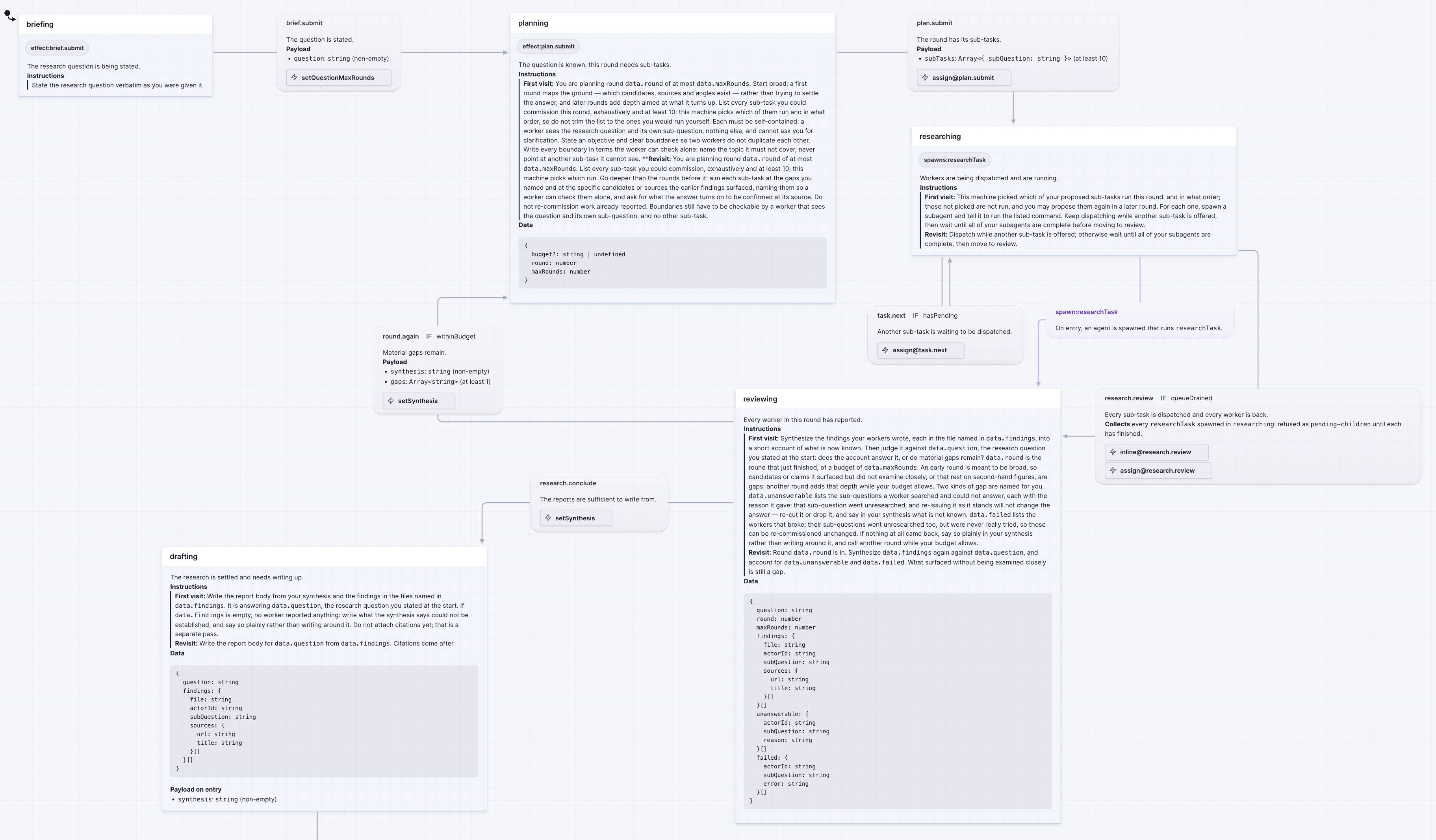
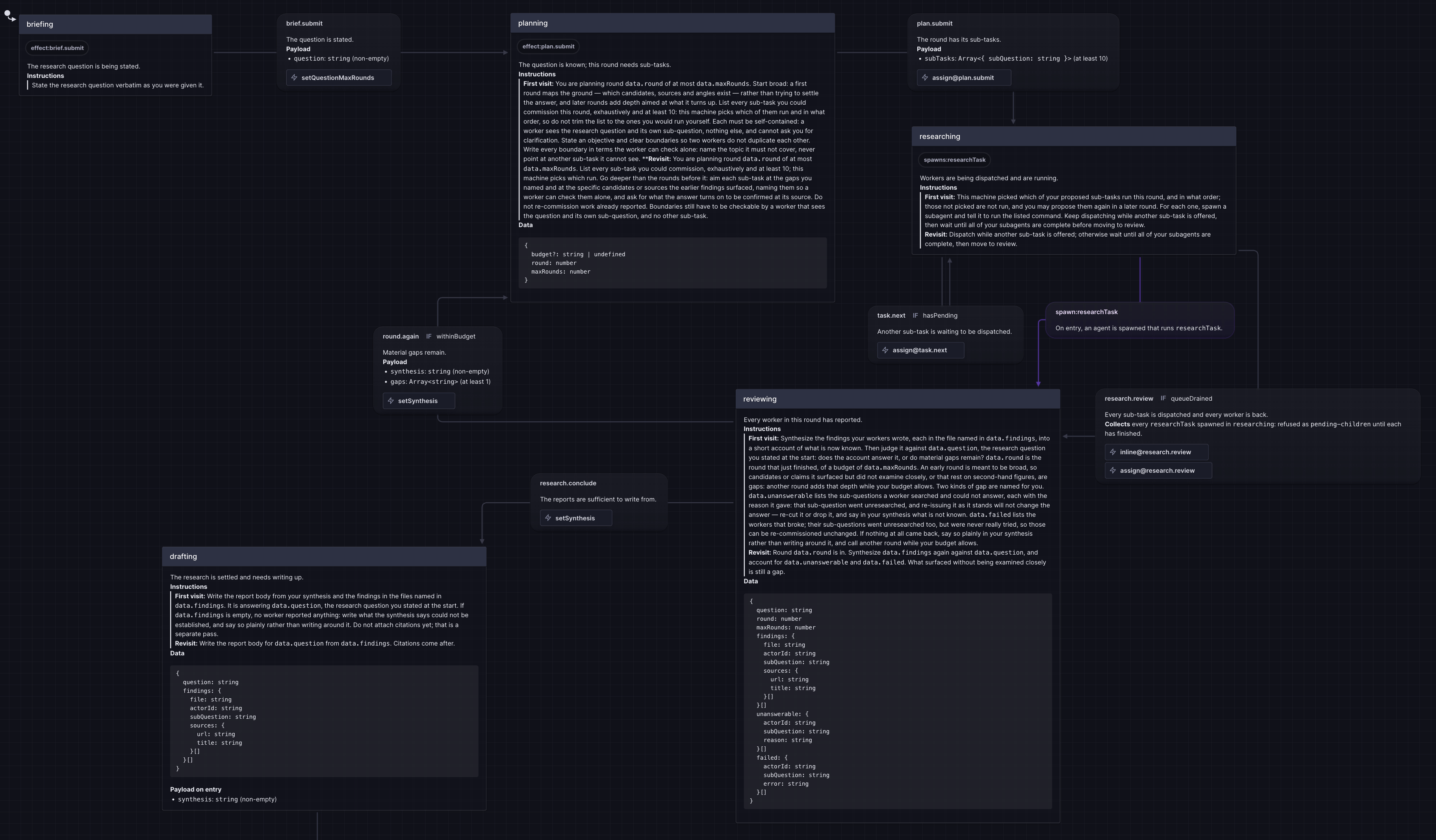
Backseat is built on XState, and Stately Studio draws XState: the states, the transitions between them, laid out and connected. Everything Backseat adds, the instructions, the payloads, the data, is rendered into the descriptions, so the drawing says what each state will say to the agent. It is for looking at. Nothing reads it back.
you write · one command, and a file per machine to import
$ node cli.ts stately
…/deep-research.stately.ts
…/deep-research.researchTask.stately.tsyou see · the lead machine drawn in Stately Studio, briefing through drafting


I'll tell you everything, once we're on the road
Most agents start under a wall of instructions: every rule, every step, every case, read before anything has happened and carried through everything after. Here there is nothing to read first. The agent starts the workflow, and from then on it is told what it needs when it needs it: what to do in the state it is in, which transitions are open from there, and nothing about the rest of the workflow until it gets there.
$ node cli.ts --drive create deep-researchyou know this neighborhood
A state's instructions are told which visit this is, and say what that visit needs. Here the first visit explains the whole job; every return, with that explanation still in the agent's context, gets one line that points back to it.
you write · research-task.ts, the worker's searching state, cut to its instructions
searching: {
description: 'Queries are being worked one at a time.',
instructions: ({ visit }) =>
visit === 'first'
// the first visit
? 'You are handed one query at a time as `data.current`. Run it with whatever web search you have …'
// every visit after
: 'Run `data.current` and report it done, naming the query.',I looked it up. they're closed
While a guard can keep a transition from being shown, some reasons to refuse are only found partway through the move: an effect or an action finds one, and says so in the author's words. The workflow rejects the event with that message, says the actor has not moved, and prints the arrival again, so the next call is the corrected one.
you write · research-task.ts, the worker's finding.submit, with the effect that checks its sources
import { backseat, RejectedEvent } from 'backseat-ai' 'finding.submit': { target: 'complete', description: 'The sub-question is answered.', schema: z.object({ summary: z.string().min(80), sources: z.array(source).min(1) }), // The sources are checked at the source: a run once accepted a citation its own title called "page 404'd". // Only a page the server says is gone is refused; any other status, and any failure to reach it, passes, // since a page that blocks bots is not a page that is gone. Some servers answer HEAD with 404 and GET with the // page, so a HEAD that says gone is confirmed with a GET. effect: async ({ event }) => { const statusOf = (url: string, method: 'HEAD' | 'GET') => fetch(url, { method, signal: AbortSignal.timeout(10_000) }).then( (res) => (res.body?.cancel(), res.status), () => 0, ) const gone = await Promise.all( event.sources.map(async ({ url }) => { const head = await statusOf(url, 'HEAD') const status = head === 404 || head === 410 ? await statusOf(url, 'GET') : head return status === 404 || status === 410 ? `${url} is gone (HTTP ${status}). Cite the page you read instead, or drop it and say what rested on it.` : null }), ) const reasons = gone.filter((reason) => reason !== null) if (reasons.length > 0) throw new RejectedEvent(reasons.join('\n')) }, actions: assign({ summary: ({ event }) => event.summary, sources: ({ event }) => event.sources }), },
the agent sees · the worker's finding, refused on a source that is gone
$ node cli.ts --drive send 1b36b700…/task-1-3 finding.submit -{
"summary": "All findings come from search-result snippets only; no pages were fetched. …",
"sources": [
{ "url": "https://mdc.mo.gov/newsroom/mdc-invites-young-anglers-kids-fishing-day-june-7-shepherd-hills", "title": "MDC invites young anglers to Kids Fishing Day at Shepherd of the Hills" },
{ "url": "https://themissouritimes.com/shepherd-of-the-hills-hatchery-conservation-center-summer-activities/", "title": "Shepherd of the Hills Hatchery & Conservation Center summer activities" },
…
{ "url": "https://mdc.mo.gov/events/kids-fishing-day-shepherd-hills-hatchery-2019", "title": "Kids Fishing Day at Shepherd of the Hills Fish Hatchery" }
]
}Rejected: https://mdc.mo.gov/events/kids-fishing-day-shepherd-hills-hatchery-2019 is gone (HTTP 404). Cite the page you read instead, or drop it and say what rested on it. The actor has not moved. Conclude on `data.subQuestion`: write the finding, say that nothing supports an answer, or resume the search. … Offered — each shown in full on an earlier response in this state; call describe <event> to see one whole: - finding.submit → complete - finding.empty → complete - search.resume → searching --- 1b36b700…/task-1-3 · at summarizing · active
we're not leaving until everyone's back in the car
While the subagents work, the workflow keeps going. The first move that needs what they produce is held until all of them have finished. Sent early, it is refused, naming the subagents still incomplete. Sent once they are back, it brings their work into context.
you write · report.ts, the two states of a minimal report workflow: titling spawns two writers, awaiting collects what they wrote
titling: {
description: 'The title is being written while the sections are.',
// Two subagents, one per section, started as the agent arrives.
entry: [
spawnChild('writer', { id: () => 'introduction', input: () => ({ section: 'introduction' }) }),
spawnChild('writer', { id: () => 'findings', input: () => ({ section: 'findings' }) }),
],
instructions: 'Two subagents are writing the sections: start each with the command listed for it, then write the title yourself.',
on: {
'title.submit': { target: 'awaiting', schema: z.object({ title: z.string().min(3) }), actions: assign({ title: ({ event }) => event.title }) },
},
},
// Reached while the sections are still being written. Nothing here needs them yet.
awaiting: {
description: 'The title is set; the sections are still being written.',
instructions: 'Wait for both subagents to finish, then assemble the report.',
data: ({ context: { title } }) => ({ title }),
on: {
'sections.assemble': {
target: 'assembled',
// The first move that needs the sections. Not offered until both writers have settled; sent before that,
// it is refused, naming the ones still out. Taken, it brings what they wrote into context.
actions: collectChildren('titling', 'writer', assign({
sections: ({ event }) => event.settled.flatMap((site) => site.children.map((child) => child.output)),
})),
},
},
},sit down, I made a slideshow of the trip
Every call an agent makes lands in the record: the state the actor was in, the move it took or was refused and the reason, and what an effect brought back. The trace report draws each actor's journey from it, the states it stopped in and the calls answered from each. A run is assessed from the workflow's record, never from the agent's account. That is how a workflow improves: a wrong turn sits under one state, so the instructions to fix are that state's. Fix them, run again, and the next report says whether it worked.
you see · the trace report for run 1, the lead's journey, the refused call selected
# machine root status started last call calls undeclared where 1 deep-research 1b36b700 done 2026-11-07 13:23 2026-11-07 13:26 72 completed Report which run? [1-1] 1 …/runs/1b36b700…/trace.html (72 calls)
1b36b700… doneoffered brief.submit
createcreatedsend brief.submit→ planningbrief.submit → planning
offered plan.submit
send plan.submit→ researchingplan.submit → researching
offered research.review
send task.nextstayed, spawned task-1-2send task.nextstayed, spawned task-1-3send task.nextstayed, spawned task-1-4send task.nextstayed, spawned task-1-5send task.nextstayed, spawned task-1-6send task.nextrejected not-enabledsend task.nextrejected not-enabledsnapshotstayedsnapshotstayedsend research.review→ reviewingresearch.reviewifqueueDrained → reviewing
offered round.again research.conclude
send research.conclude→ draftingresearch.conclude → drafting
offered draft.submit
send draft.submit→ citing.awaitingdraft.submit → citing
offered citations.submit
send citations.submit→ completecitations.submit → citing.checking then alwaysifcitationsHold → citing.accepted then xstate.done.state.deepResearch.citing → complete
Sent
payload
{}
Response
rejected
Left at
researchingactive
…
I've seen how you drive without me
Backseat came from wanting more from workflows that ran on instructions alone. Each was a long prompt describing the steps, and even a frontier model treated it as a description: mostly followed, never enforced. The want was a workflow that holds its shape whichever model is in it.
So the shape is written down and enforced. You decide what can happen: the states, the transitions out of each, the guard on each one, the schema it must be sent with. The model decides what does. The workflow is semi-deterministic: every step is fixed, and the rest is the model's judgment, what it does inside the step it is in and, where more than one transition is open, which one it takes.
A model handed one step at a time, with its instructions and its schema, and refused with a reason when it strays, runs a workflow it could not have run from the prompt. It does not have to be a frontier model. A cheaper one, in the same workflow, handles multi-step work it could not on its own.
three roads. all of them signposted
One command comes with the package and reads no project: npx backseat-ai. Everything that reads your machines runs through your project's own cli.ts, which init writes: your commands plainly, the agent's under --drive.
report <prefix> picks a run by its root id; report <dir> renders any directory holding a trace.- reads the JSON from stdin.scoot over. I'm getting in the back
init sets the directory up as a project and, with no machine to find in your source, offers a starter: one state, one move, then finished. Run it again any time; it finishes what is missing and leaves the rest alone. For the coding agent that writes your workflows, npx skills add pottedmeat/backseat-ai --skill backseat-ai installs a companion skill.
… created package.json — my-agent updated scripts.typecheck — tsc $ npm install backseat-ai@^0.1.0 xstate@^5.32.6 zod@^4.5.4 … updated dependencies — backseat-ai xstate zod $ npm install -D typescript@^7.0.2 typescript5@npm:typescript@^5.9.3 @types/node@^26.4.1 … updated devDependencies — typescript typescript5 @types/node created tsconfig.json created cli.ts created my-agent.ts — the smallest machine: one move, then finished created machines.ts — registers my-agent ok node cli.ts --drive — fronts my-agent Set up. Start a machine with `node cli.ts --drive create <machine>`; lint with `node cli.ts lint`.